> ## Documentation Index
> Fetch the complete documentation index at: https://docs.bindbee.dev/llms.txt
> Use this file to discover all available pages before exploring further.
# Embedded SDK
> Embed Bindbee's connector link flow inside your own product, with React or plain JavaScript.
[Magic Link](/get-started/how-to-connect) hands your customer a URL and needs no frontend code. The Embedded SDK does the same job inside your product: your user clicks a button in your UI, authorizes their HR system in an overlay, and never leaves your app.
Steps 1 and 3 run on your server. Both use your API key, which must never reach the browser.
## Step 1: Create a link token
A link token authorizes one linking session for one end user. Full reference: [Create Link Token](/sdk/create-link-token).
```bash theme={null}
POST /api/embedded/v1/link/create-link-token
Authorization: Bearer
```
```json Request theme={null}
{
"end_user_data": {
"org_name": "Acme Inc",
"origin_id": "acme-4471",
"email": "hr@acme.com"
},
"category": "HRIS",
"integration": "bamboohr"
}
```
```json Response theme={null}
{
"link_token": "KJDXZk8zC8Tdr-suQCy7zkALZVLjhKXyMd83leqheEGQpBx_evXrHA"
}
```
| Field | Required | Notes |
| - | - | - |
| `end_user_data.org_name` | Yes | The customer organization this connector belongs to. Minimum 2 characters. |
| `end_user_data.origin_id` | Yes | Your own unique identifier for the end user. This is how you match the connector back to a record in your system. |
| `end_user_data.email` | No | Contact email for the end user. |
| `category` | Yes | One of `HRIS`, `ATS`, `LMS`, `CUSTOM`. |
| `integration` | Yes | The integration slug, for example `bamboohr`. See [Integrations](/get-started/integrations). |
Call this from your **server**, never the browser. It takes your Bindbee API key, and exposing that key would let anyone read every connector in your account.
The key also decides the environment: a Development key creates a Development connector, a Production key a Production one. See [Environments](/get-started/environments).
## Step 2: Open the link flow
Pass the token to the SDK. Opening the flow mounts a full-screen overlay on top of your app, where the user signs in to their HR system and authorizes access.
```bash theme={null}
npm install --save @bindbee/react-link
```
React 18 or later. The package ships its own TypeScript types.
```jsx App.jsx theme={null}
import { useBindbeeMagiclink } from "@bindbee/react-link";
const App = ({ linkToken }) => {
const { open } = useBindbeeMagiclink({
linkToken,
onSuccess: (temporaryToken) => {
// Send this to your backend to exchange for a connector token
fetch("/api/bindbee/exchange", {
method: "POST",
body: JSON.stringify({ temporaryToken }),
});
},
onClose: () => console.log("Linking flow closed"),
});
return ;
};
```
The hook returns `{ open }`. Call it from a click handler.
For any frontend that is not React. Add the script, then initialize it.
```html theme={null}
```
```js theme={null}
window.BindbeeEmbed.initialize({
linkToken: "LINK_TOKEN",
onSuccess: (temporaryToken) => {
// Send this to your backend to exchange for a connector token
},
onClose: () => console.log("Linking flow closed"),
});
// Then, from a click handler
window.BindbeeEmbed.open();
```
`initialize()` throws if `linkToken` is missing, and `open()` throws if called before `initialize()`. Call `window.BindbeeEmbed.destroy()` to remove the overlay and its message listener.
`integrity` verifies the script has not been tampered with, and `crossorigin="anonymous"` is required for that check to run. An unminified build is at `https://cdn.bindbee.dev/initialize.js`, with integrity `sha512-2Rzjv7TfBrXNCgB1wLTnpZupTZh6/JS0tQkKTGRu9fC7IAK4ahbPzcu29VUGHOmRPquLNU6RkLyt6yVuKR60DQ==`.
Both take the same options:
| Option | Type | Notes |
| - | - | - |
| `linkToken` | `string` | Required. The token from Step 1. One token, one linking session. |
| `serverUrl` | `string` | Set to `https://api-eu.bindbee.dev` for the EU region. Defaults to US. |
| `onSuccess` | `(temporary_token) => void` | Fires when the user completes the flow. You get a temporary token, not the connector token. |
| `onClose` | `() => void` | Fires when the overlay is dismissed, whether or not linking succeeded. |
Register **one instance** per page. A second one logs an error and will not behave predictably. In React, lift the hook to a shared parent if several places need to trigger it.
## Step 3: Exchange for a connector token
The temporary token from `onSuccess` is not an API credential. Send it to your backend and exchange it for the real one. Full reference: [Get Connector Token](/sdk/get-connector-token).
```bash theme={null}
GET /api/embedded/v1/connectors/connector_token/{temporary_token}
Authorization: Bearer
```
```json Response theme={null}
{
"connector_token": "jk23h4jk23hk4j2h3kj4h23kjh4k23jh4k2j3h4",
"connector_id": "123e4567-e89b-12d3-a456-426614174000"
}
```
Store the `connector_token` against the customer record you identified with `origin_id`. It is the credential every later call uses, as the `X-Connector-Token` header on unified endpoints, [Passthrough](/guides/extending/passthrough), and [custom fields](/guides/extending/custom-fields).
This exchange uses your API key, so it belongs on your server too. Treat the returned `connector_token` as a secret: it grants access to that customer's HR data.
## Behavior worth knowing
| | |
| - | - |
| Overlay | A fixed, full-screen iframe with id `magic-link-flow`, prepended to `document.body`. |
| Page scroll | Locked while the overlay is open, restored on close. |
| Dismissal | Closing from inside the flow removes the iframe and fires `onClose`. |
| Repeat opens | Calling `open()` while the overlay is already mounted does nothing. |
| Styling | The flow is Bindbee-hosted. Branding is configured in the dashboard, not through the SDK. |
## Errors
| Status | Meaning | Fix |
| - | - | - |
| `401` | API key missing or invalid. | Check the `Authorization` header on your server call. |
| `403` | Credentials valid but not permitted for this resource. | Confirm the category and integration are enabled for your account. |
| `404` | No connector found for that temporary token. | Tokens are single use and short-lived. Re-run the flow. |
| `422` | Validation failed. | Check `org_name`, `origin_id`, `category` and `integration`. |
| `429` | Rate limit exceeded. | Retry after `Retry-After`. See [Rate limits](/api-reference/basics/rate-limits). |
## Related
`@bindbee/react-link` on npm.
API keys and connector tokens.
Get notified when a new connector finishes its first sync.
Point your AI assistant at these docs while you build.
This documentation is built and hosted on [Mintlify](https://mintlify.com), a developer documentation platform.
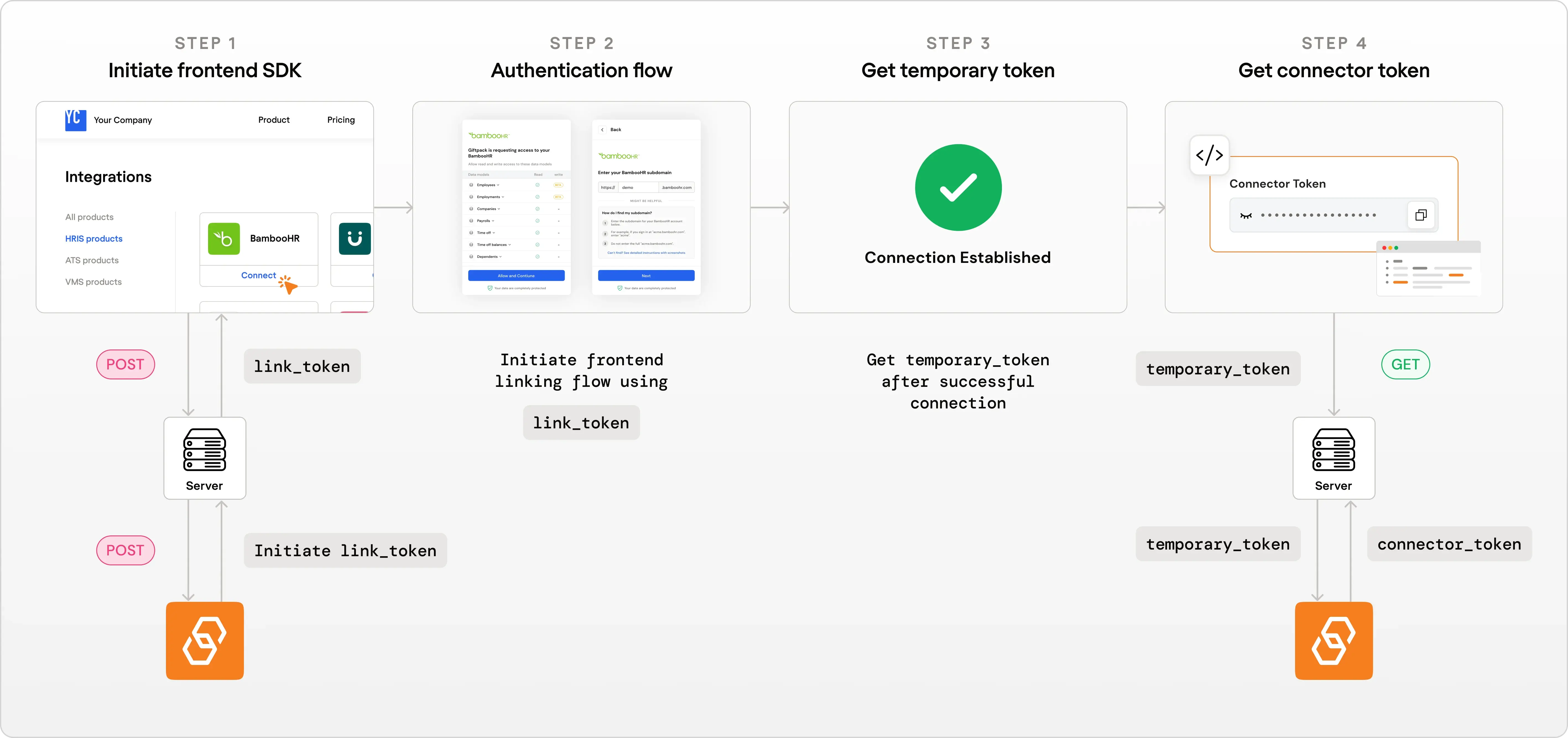 Steps 1 and 3 run on your server. Both use your API key, which must never reach the browser.
## Step 1: Create a link token
A link token authorizes one linking session for one end user. Full reference: [Create Link Token](/sdk/create-link-token).
```bash theme={null}
POST /api/embedded/v1/link/create-link-token
Authorization: Bearer
Steps 1 and 3 run on your server. Both use your API key, which must never reach the browser.
## Step 1: Create a link token
A link token authorizes one linking session for one end user. Full reference: [Create Link Token](/sdk/create-link-token).
```bash theme={null}
POST /api/embedded/v1/link/create-link-token
Authorization: Bearer